Tuesday, October 14, 2014

Windows 10 Preview: Why do I even care about it?

Several years ago when Adobe decided to drop support for Windows XP in Lightroom there were a number of people that were upset. Many people were still using Windows XP despite the fact that the OS had been released over 10 years previous to the announcement. However, Adobe had decided that the OS was limiting their ability to move forward with their software titles and let XP die a peaceful death. That left a lot of people with some decisions to make.

From my personal experience with the Microsoft* OSes, I'll list a brief review of actually using them in real life:

Windows 3.11 - meh.
Windows 95 - okay. Introduction of the Start Button.
Windows 98SE - OMG this is awesome. Gamer's Delight!
Windows ME - WTF is wrong with Microsoft? Nothing works.
Windows 2000 - Okay, I understand who this is for.
Windows XP 64bit - Very good. Kinda sucks on 32bit, but most people didn't have 64bit like I did.
Windows 2003 - The gold standard for most people with their MCSA
Windows Vista - meh. Microsoft's "minimum requirements" were set much too low.
Windows 7 - Finally, a decent replacement for Windows XP.
Windows 2008 - Same feel as Windows7, but all the server tools that nerds like me need.
Windows 8 - WTF? Where is "Start?" Multiple Personality Disorder between traditional desktop and "Metro" UI.
Windows 8.1 - The return of the Start Button... but everything else still sucks
Windows 2012 - Wait, why only a 4 year product cycle on a server OS? $$$$$$
Windows 9 - mysteriously absent
Windows 10 Preview - What this post is about.

With Windows 10, it appears that we might have a real candidate to replace Windows 7 in home environments. Most businesses won't budge from Windows 7 until solid proof that a new OS is up-to-snuff.... Which Windows 8 is certainly not.... But Windows 10 might be able to do it once the 1st Service Pack comes out.

When I test out a new OS, I don't load it onto a blazing fast quad-core with 16gigs of ram and huge hard drives with SSDs for the /. I load it on an absolute piece of crap that I have lying around. Why? (you may ask...) Well, Lemme put it this way: Most people don't upgrade their hardware just to run a new OS. It's expensive to have that short of a lifecycle with hardware... (don't tell Mac users though... they get really huffy about their elitist hardware). So with that said, I installed Windows10 Preview 32-bit on my MSI Wind U110 with the anemic Intel Atom Z530, poorly-support Intel GMA500 graphics, flaky WiFi "G", 2GB of RAM, but I have upgraded the 160GB WD Blue that it came with to a A-DATA 32GB SSD... for which there is no discernible performance increase due to the Atom sucking air most of the time. This netbook is probably my biggest source of buyer's remorse I've ever had but it functions "meh" enough for messing around with in situations just like this.

After installing the ISO from Microsoft onto USB stick, I started up the laptop for the install process only to discover that my SSD was missing. The Silicon Image SATA controller's driver wasn't part of the included drivers on the ISO. Windows7 included the driver, but Windows10 does not (as of this writing). After snagging the driver from MSI's website and throwing it on another USB stick for install, the SSD was recognized and away we went. The install took about the same amount of time as most other OS installs on this netbook: Overnight while I slept.

The "Who Are You?" style information that the OS wants is about the same as W7 but with a different paint job. All but the most-clueless users will float right through the prompts. When we finally get to the desktop we get a familiar view.


One thing that I did have to change right away is the screen resolution. 1024x768 is the "normal" resolution on Windows, but my display is actually 1024x600 on this netbook. The screenshot doesn't "squish" the image like it does on the screen, but the difference on the viewing experience is noticeable.

After the change:

Little did I know that changing the resolution to the native size for my screen would cause problems later in some of Windows10's apps. This is most noticed when you attempt to view the Store, One Drive, or Search utility.


What I found entertaining is that you can open up the Screen Resolution panel, change it to 1024x768, open the app you want, then change the resolution back to native.


This problem was easy enough to complain about in the Feedback app, which ALSO required the resolution hack to be used to open... Tsk Tsk on reducing functionality in order to keep things "pretty."


The apps are interesting. Some of them might be useful. It's really good to see Microsoft finally trying to have simple apps be as simple to install as Ubuntu started doing with Unity 2 years ago.


Speaking of things that Ubuntu has been doing for years, the Task Switcher is fairly familiar to those that have used this in the past.


On this netbook, the windows maximize and minimize with relative snap, but you can also tell that even when there aren't many apps open, the Atom Processor is relatively busy to make things smooth while trying to conserve power by leaving the core under-clocked in most cases.


All of the normal Power Option seem to work correctly, and the Critical Battery shutdown seems to work as it should. This is important to anyone that's on the go and always pushing their luck with their devices.


Everyday use of the OS has been relatively painless until my obsession with multiple tabs open in Chrome. I will note that during streaming of sound or video that it can be choppy depending on the quality of the data. Video cannot run at even 720p on the netbook while "Normal" quality in Spotify was okay *most* of the time. In other cases, I'd get an occasional "oh crap" message, but it was rather non-descript.

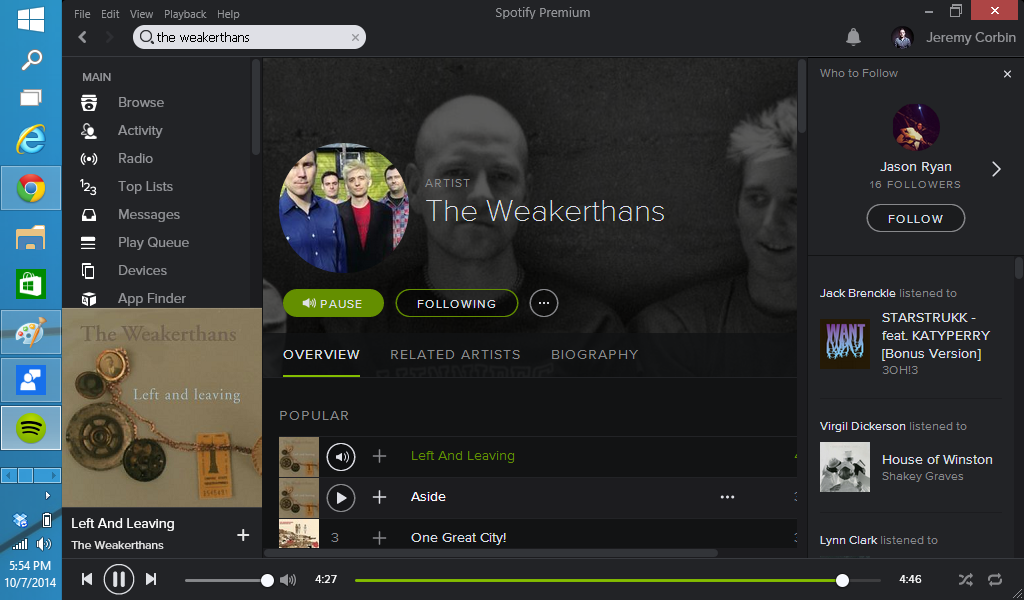


Finally, back to my original point of why I tried this OS out: Could I stand it being installed on my main Lightroom/Photo Editing rig? Yes. I don't believe that there is enough different with the interface that I'd hate it (which is why Windows 8.1 won't ever touch my rig). This is a double-edged sword though.... There isn't enough different to warrant the upgrade, at least as far as the GUI is concerned. I might need to install W10 on a separate SSD for testing on my LR rig, but until I do that, there's no benefit to destroying my workflow for an experiment. So, do I recommend this for playing around and watching cat videos on YouTube? Sure, but W7 is solid at that already. Should you upgrade for the sake of upgrading on a machine that you have an established workflow on already? NO. Wait for Service Pack 1 like the IT-nerds do.


* - Note that I'm currently using Ubuntu 14.04 LTS for my everyday computing needs. It does almost everything I need with the glaring exception being that Adobe Lightroom does not run natively in Linux... and Wine implementations are wonky and inconsistent if you can even get it installed/running.

Tuesday, March 25, 2014

#dedpxl01

Zack Arias recently started up an Assignments section on his new sub-blog, DEDPXL. I haven't shot a ton in the past 6 months (even for personal work), so I thought it would be awesome to jump in and see how well I can follow directions.... :-)

This assignments was "lines" which I found to be quite difficult. You see, When I think "lines" I think straight lines. Always. This little phenomenon of "only straight lines" pissed off my art teacher in college to no end. In this assignment, all of the shots are from my Android using the Vignette app.

So without further stalling:


Based on these results, my filter for black and white conversions is well beyond "a little muddy" and it would be useful for me to take a look at my phone photos on my color-balanced monitor more often. The top 2 photos are basically how I saw them in my head, while the last one I could have turned down the dark corners a little. Beyond that... I'm hoping for a C since I have a really hard time with following directions. :-)

Thursday, September 19, 2013

The Power of Music

Every once in a while, I find myself caught completely off guard by a song I hear. I won't even have to hear the song for a flood of memories to rush in and get me reminiscing of a time and place that happened half a life-time ago. Mostly, I think about the people that were in my life... and on occasion one song reminds me of one person along with all of the decisions that were made that helped shape that relationship.

Now, don't get me wrong: A lot of people get this feeling of nostalgia that comes along with hearing an old tune on the radio, but I find myself literally caught off guard, including a rush of emotions that leaves me feeling vulnerable. It's a rather strange feeling.

Even more strange is the thought that hearing a song that was written well-after a time in my past can remind me of a person, and then the song that I associate with that person plays in my head at the same time the newer song is playing... I guess it isn't true what they say: Men DO have a multi-track mind.

Although the person that I'm reminded of will never read this post, I feel compelled to tell a story with as much ambiguity as possible... I know that sucks for the reader, but since there are only 3 people that follow this blog... I think I'm in the clear. ;-)

I'll start off with the song that was written well after the memories I have: The Dillinger Escape Plan's Parasitic Twins. The words have made me think about the same person EVERY TIME I've heard them. What's most astounding about this song is the words just.... remind of things that I should have said, but didn't say... because I didn't know I had a time limit to say them. It's like it's a dying man's lament in regards to the proverbial "shoulda, coulda, woulda." The video I'm attaching isn't a video of the band... but it's portrayed exactly the way that my memory fits the song:


Obviously, the old lady is the "girl" that I'm finding myself thinking about.... She made things for me; Not in the literal sense, but the proverbial. I adored her... Actually loved her... Deeply... and I never told her the depth of my feelings because there was never an appropriate time to do it. As a result, we never dated. What's super strange is I find myself to actually be in this video twice: In one instance, I'm the extraordinarily-tall gentlemen that's dancing and carrying on with the old lady. And in the other, I'm the "bell hop" that's simply watching, even guiding myself in the dream/fantasy that has been created. I can't really interact with myself. One skewed (yet incredibly accurate) detail is that the old lady in the video is how I see the person in my life now... It's like she has aged after the time the memory was created.... but I didn't. That's why this video is so fitting to the song in my head. I didn't age in my memory... but I can't allow her to not age due to the passage of time. She's still beautiful, but the passage of time for her is indicative of not being able to go back and "fix" my mistakes.

Mistakes.

Mistakes is what brings me to the original memory that was created: Cake's Never There. It's the song that was present when I was deeply lamenting over what had happened. The live version is actually better since it's incredibly imperfect... but you can hear John McCrea's voice just so "angry" about what happened. That live voice can't hide what he was able to during the recording of the album... It's true: I was literally angry, and hurt, when my moment had passed and I had done nothing:


Anyway, the passage of time can allow some wounds to heal, but when you hear an old (or newer) song that causes those feelings to rush back and try to tear you apart again. It's agonizing. Don't get me wrong: I love my life now and how it is, but when those feelings from the past rush back in it's incredibly painful despite what the current situation in life is.


Drop a comment if you know what I'm talking about... Or don't.

Tuesday, July 30, 2013

Lightroom 5, Adjustment Brush Chaos

Last week I upgraded from Lightroom2 to Lightroom5. It's a rather large revision integer increase... but from what I've heard about the adjustment brushes being enhanced it seemed like the time to do it.

Given: My setup is not a traditional photographer's setup being that my extensive background in IT prevents me from having a "normal" setup. I simply know better than to just "let it be."

With that said, here is a list of geeky stats that mortals can feel free to skip without retribution:
AMD AthlonII X3 455 - (3.3GHz TripleCore)
GSkill 2x4GB DDR3 1600
Seagate 250GB (7200.10) for the filesystem
WD 2x500GB (620AS) (RAID1) for the DNGs, JPGs, and LR Catalog Backups
IBM LTO2 Drive for Long Term Archiving
Ubuntu 13.04 x64 HOST
Windows 7 SP1 x64 Guest (with 2cores, 4GB RAM, and 40GB HD reserved)

As most geeks can see, my system is fairly modest as far as components go. In LR2 (XP Guest) I noticed when using SyncAll and Exporting that it would take quite a while to get those functions done. I believe that this is purely due to a lack of available clock cycles and RAM. Upgrading hardware has been on my To Do list for two years, but I'm content just grabbing a bite to eat while I export photos.


Regular Folk continue reading here:
My initial review of it is that it's faster in some ways and slower in others. The interface loads faster than LR2. Exporting photos and Adjustment brushes execute about the same. What is slower is the backup of the catalog. I don't segregate my catalogs like other folks I know so everything is in one giant file going back to 2011 so this isn't a big factor for those folks.

I've tried the new sharpening algorithms and I was able to take a photo with unacceptable sharpness to acceptable. That's something that LR2 wouldn't have been able to handle: Out of Focus edges stayed out of focus and unrecoverable. So this bit is fairly impressive. Don't think that the new sharpening will save your ass when you blow it though since this isn't magic. Those of you with Canon 85/1.2 will still have blurry eyes of you're not paying attention. My tests at 35/2.4 (which is fairly forgiving) still had issues when it came to being loose with focus points and technique.

The Noise Reduction is definitely better than LR2, but again, it's not magic. My test shots at ISO800 were passable, but still not anything good enough for me to share online. More Light is Better. Good Technique when shooting saves more time with better results than the "fix it in post" mentality.

One issue that miffed me was the adjustment brush wouldn't appear in the Develop module unless I hovered over the Size and Feathering sliders.

Mouse hovering over image field (no, really... totally invisible):

Mouse hovering over Size slider:

I could still use the brushes, but obviously accuracy was in the crapper since I couldn't actually see where the brush IS...only where it HAD BEEN. This is obviously troublesome for workflow. I found an article HERE that talked about this issue, but I thought I'd walk through it briefly while I was talking about it. All that I needed to do was decrease the amount of acceleration that was being used for the video card. (Sidenote: Yes, this affected Windows7 when natively installed as well as virtual machines.)

Firstly, use the Control Panel to bring up the Display Settings, then select Advanced Settings:

 Then select the Troubleshoot Tab, then click on Change Settings:

From here, back off the Hardware Acceleration slider from Full to the Next-Best setting and click OK:

Once your back into the Adjustment Brush Tool in the Develop Module, the brush is actually visible:

Anyway, I'm looking forward to using LR5 in the coming months and I'm hoping that there aren't any additional weird stuff with the interface but we'll see. I don't upgrade software very often so I'll be sure to relate if this integer increase was actually worth it in the long run.

Tuesday, July 16, 2013

Stagnation


I'd love to say that I've been completely inactive for the past 6 months because I'm working on some super-secret project.... but I can't.

I'd love to pretend that I'm the too-big-for-my-britches fancy-schmancy photographer that declares each project or job they've completed was a total success on facebook and other social media... but I can't.

I'd love to post 4 beautifully lit shots with a background story with this post... but I can't.

I haven't even been shooting much on my phone let alone anything proper.

I can't lie to myself and I can't lie to you: I haven't been shooting because I've been depressed... and I've been depressed because I haven't been shooting. I'm exceedingly aware of this detrimental reciprocity but I can't seem to pull out of it. It's certainly not due to a lack of trying; Plans and Shoots keep falling apart. Scheduling issues and not feeling well have been contributing to the issue as well. Grandparents have died, loved-ones are getting cancer, memories of disappointing old teachers...

So what's happening with me?
Did I define my niche' so well that the right client is as rare as triple rainbows?
Did I price myself so that I no longer lose money on each job only to discover that now no one can afford me?
Do I really suck at photography as much as the voice in my head says I do?
Did I decide to make work that's so random that it's not meant for general consumption?

It's quite the conundrum: On one hand, I'd love to be so busy with work that everyone books me for everything like I'm a brand-new photographer doing family sessions for $25 including a DVD of 1000 images... BUT... on the other hand I want my work to be paced properly and high-quality like the client just paid me $1000 for a single print on their wall. Does the price I place myself at matter as much as the work I make? Not at all, but watching social media lately it looks like everyone is suffering from Multiple Personality Disorder.

I'm beginning to see why photographers just shoot for themselves and declare to the world that they're Fine Art Photographers instead of trying to wrangle in clients that don't really "fit" their niche'... That sounds lovely right now: Paying subjects to sit down and be patient with me while I extract photos from idea precipitate, then sell huge, limited-edition prints of the work at the Artist's Market or consignment walls at the local pub to the correct client. Complete control over my process would be amazing.... Complete control over my life would be amazing.... but that's not what I have. That's not what any of us have. I have to make my time away from my family count for something and that means getting compensated in a way that's easy to calculate in US Dollars.

If you've made it this far through the post maybe you feel the same way about something in your own life. Most people keep these negative thoughts in their own head but I've been doing that for months and it hasn't been helping. I'd rather be complete honest about myself than pretend that I'm something that I'm not. "You shouldn't say that stuff because it's bad for your business!" Sure... Maybe... But if I'm lying to everyone about how awesome my life is isn't that just as bad?

Its time for a change. I'm off to schedule something awesome in hopes that it pans out.
What are you going to change in your own situation?

Saturday, February 16, 2013

Selfie Challenge!!!! #3

Imagine that Voice-Over-Guy that does work for the Movies...

The Self Portrait Challenge.... One Man.... One Woman... taking photos of themselves....

Okay... that's enough of that.


Last Week, Carolina posted a lovely mirror shot, per my request. You can see the results of that photo here: Self Portrait Challenge, Round 2

Her Challenge in response to mine? "A photo booth type series with a different emotion in each photo."


Brutal. Showing emotions is really hard for me... Being happy is great and all, but showing other emotions honestly, and in public, can be really hard. It reminded me of the Japanese and how they have one "mask" that they put on at work and something else when they're being truthful... It's called Honne and Tatemae. You can read about it here: http://en.wikipedia.org/wiki/Honne_and_tatemae


Anyway, with that in mind, and the fake emotions we put on, here is this week's submission:


Emote
Nerd Alert: Shot with my Android using Vignette with the "Holga" filter. Arranged in GIMP 2.6

Carolina, This week your challenge is to use off camera flash... but not just FOR your photo.... I want the Off Camera Flash to be IN the photo. ;-) (I'm sure you have a flash laying around somewhere....)

Tuesday, February 5, 2013

Self Portrait Challenge #2

Hello All 4 of you!

If there's one thing that I love (I mean, one thing of many) it's receiving a challenge from someone... If there's something that I love more, it's challenging someone else!

Continuing from last week, +Carolina Yocom and I have been challenging each other once a week to a themed self portrait. I asked her to make her shot with light bouncing at least once. She did exceedingly well and made the shot much more subtle than I anticipated.

Read her post HERE.

This week, her challenge to me was a self portrait "with very shallow depth of field, focus being somewhere other than them thar eyeballs."

I'm hoping I took things in a direction she didn't expect:

"Monocle" 

Nerd Alert: Pentax K10, Kiron 35-135/3.5 Macro, AlienBee 400 @1/8th. 1/125, f/3.5, ISO100 (I think)


My dear Carolina, this next week's challenge to you is this: Self Portrait using a mirror. Have fun!